
How to remove the background from a photo on Android
By Four K Computing ·
Short answer
Open the photo in FourSnap, go to Tools and tap Background. FourSnap finds the subject and cuts it out, hair included. Choose None for a transparent background, or pick a colour, a scene or your own photo, then export as PNG to keep the transparency.
Step by step
- 1
Open your photo
Open FourSnap, tap Open photo and choose the picture.
- 2
Open Background
In the editor, tap Tools, then Background. FourSnap picks the main subject automatically.
- 3
Fix the selection if needed
Tap the photo to pick a different subject. Use Mark to scribble over a part the AI should add, or switch to Take away to remove a part.
- 4
Choose the new background
Pick None for a transparent background, a solid colour, a painted scene, or one of your own photos.
- 5
Export as PNG
Tap the check mark, then Export. Format Auto saves a PNG whenever there is transparency, so the cut-out keeps its clear background.
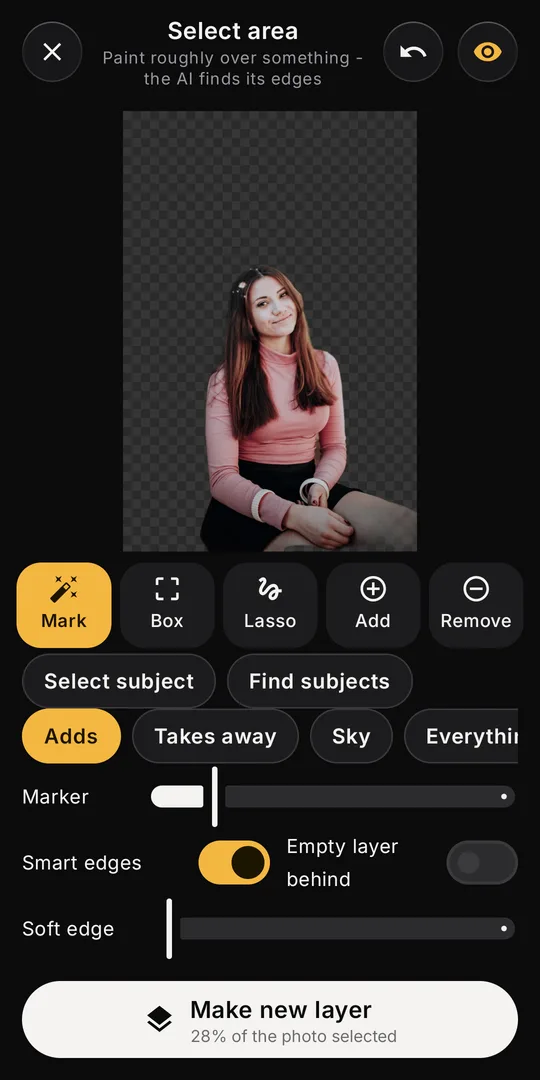
Cut-outs you can move: Select subject
If you want the subject as its own layer - to move it, resize it, add text behind it or drop it into a template - use Layers instead. Tap Layers, then Select area, then Select subject. Tap Make new layer and the cut-out appears above the photo, ready to drag, resize and restyle.
Find subjects lists every person, pet and object FourSnap can see, so you can pick one when there are several. Mark, Box and Lasso let you choose by hand.
Getting clean edges
- Hair and fur: FourSnap refines fine edges automatically. Zoom in to check, and use Mark over any missed strands.
- Soft edge: raise it slightly for a natural blend when the cut-out goes onto a new background.
- Shadows: decide whether you want them. Take away removes a shadow the AI included.
- Busy backgrounds: if the subject and background are similar in colour, add a few Mark strokes along the edge.
Ideas once the background is gone
- Product photos on a clean white or coloured background for a shop listing.
- Profile pictures with a solid brand colour behind you.
- Text behind the subject, so the person stands in front of the words.
- Templates where the subject steps out of the frame, such as Story grab and Post card.
Questions
How do I keep the background transparent?
Export as PNG (or leave the format on Auto, which picks PNG when there is transparency). JPEG has no transparency and fills it with white.
Can FourSnap cut out hair?
Yes. Select subject and Background refine hair and fur edges automatically, and you can touch up with Mark.
Are my photos uploaded to remove the background?
No. The cut-out is made on your phone; nothing is sent anywhere.
FourSnap
The AI photo editor that runs on your phone.
AI Eraser, background remover, face retouch and filters. No uploads, no account. Coming soon to Google Play.
See FourSnap